
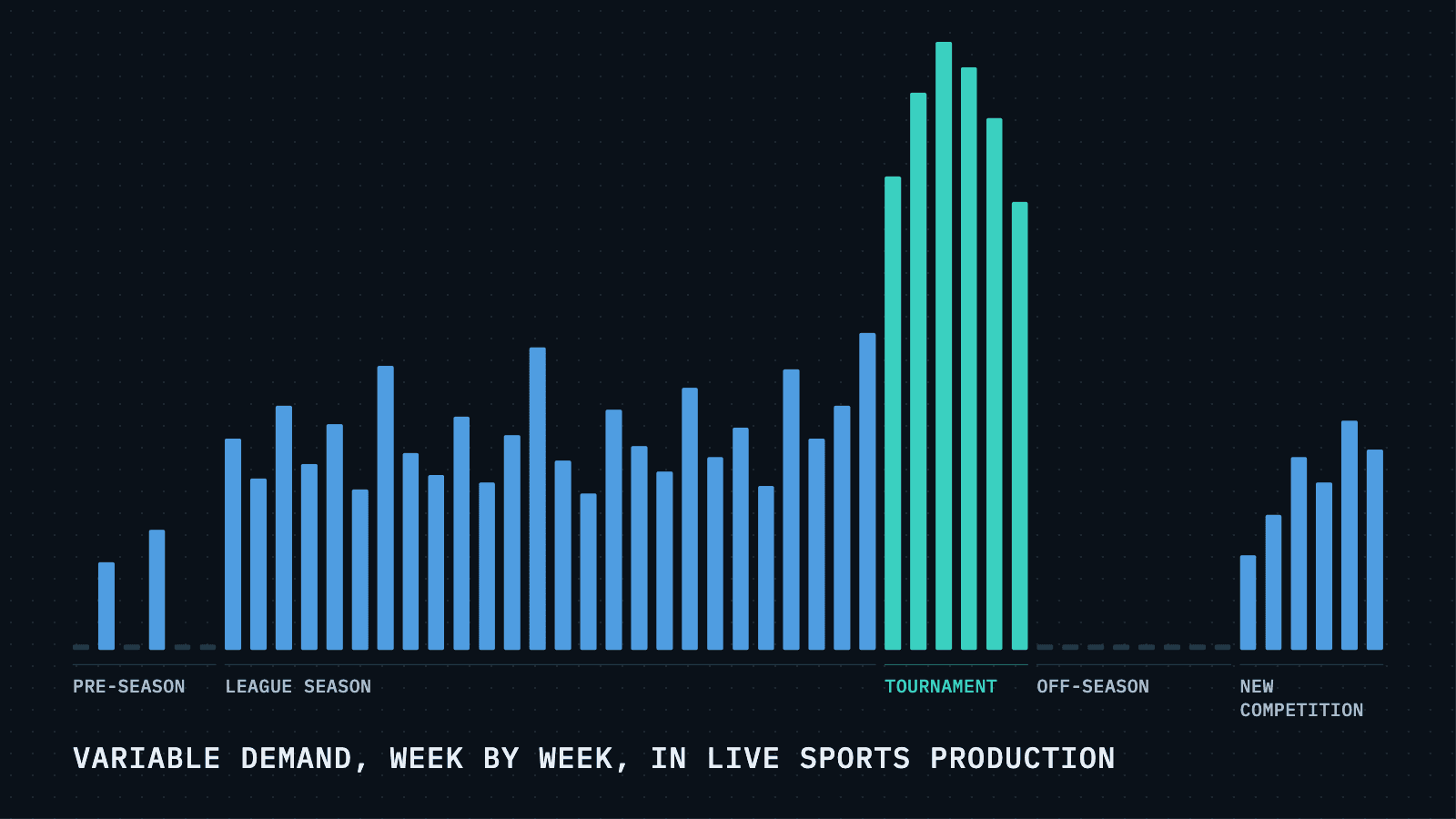
No two weeks of the global sports calendar look quite the same. A league will run for months while a tournament may be compressed into a fortnight and a high-stakes racing event may span just days. Though there are quiet periods between these events, production and distribution patterns are often planned as if every event needs the same fixed setup, running all year round.
Livelink offers a better approach in which live video workflows can follow the requirements. Resources can be deployed and orchestrated as needed for each season or event, adapted for each sport and market, and wound down or reconfigured when the schedule changes. And it all runs on a pay-as-you-go model, making it possible to manage seasonality in operating expenses, as well as seasonality in revenue.
Hitting a Moving Target
Because every sport has its own rhythm and requirements, it’s difficult to size fixed production operations effectively. A setup that fits the opening weekend of a season will be far more extensive than is needed for a midweek fixture. A workflow built for one domestic feed is not sufficient to support an international tournament with multiple languages, outputs, and takers.
For broadcasters, rightsholders, and production companies covering live sport, the challenge lies in handling workloads that change month to month. This is impossible if all events are supported by the same fixed production operations.
Enabling flexible and scalable operations, Livelink allows users to spin up environments when production requires them and spin them down again when it doesn't. Integrated scheduling lets teams plan those windows ahead, so a workflow is ready in time for the first feed and released once the last output has gone. Livelink Studio applies the same pattern to production. A team can build a production, test and refine it, then shut it down cleanly until it is needed. When the next event comes round, the same workflow is launched again, built the same way every time by the same orchestration that runs the rest of the platform.
As a result, teams taking on seasonal planning can ask what each period of the calendar actually needs rather than maintain an overprovisioned setup most of the year. The plan might be divided as follows.
- Peak weeks: more environments and productions running in parallel, with extra outputs for international takers.
- Regular fixtures: a repeatable setup launched for each event, then released.
- Off-season: little or nothing running, with productions saved and ready for the next season.
- Between competitions: existing workflows reconfigured for a new sport, market, or format.
Adapting to seasonal variations requires more than simply switching technology on and off; it also involves choosing the right workflow for each part of the schedule.
Planning Workflows Rather Than Individual Events
A single event is a useful unit for scheduling, but it is a poor unit for planning. Workflow requirements are the better guide: which feeds come in, how they are produced, which graphics and languages are applied, and where the finished output needs to go.
That way of thinking is built into Livelink, which is designed to serve the widely varying needs of broadcasters, rightsholders, streaming services, and other media organizations handling live video. With exceptional adaptability, Livelink addresses a broad mix of workflows ranging from occasional-use events and remote production to 24/7 distribution. Regardless of the use case, workflows can be built consistently, launched quickly, and run reliably, making operations more predictable and more efficient. And because any given workflow can be reshaped rapidly, teams are ready for the unexpected changes that often come with live production.
The Livelink environment simplifies configuration and execution of a complete workflow covering ingest, processing such as transcoding and multiviewing, and delivery to every destination. Because the platform provisions, orchestrates, and automates that workflow as one unit, it can be deployed, modified, scaled, and removed as one rather than as a collection of separate components.
Already proven across top-tier contribution and distribution workflows, the Livelink workflow-focused approach now extends upstream into live production as well. Livelink Studio adds cloud production and master control to the platform, and it can be used as a stand-alone module or alongside Livelink contribution and distribution. Either way, the result is the same: broadcasters and production teams can adapt the workflow to the production rather than force every production into the same setup.
Tailoring Production by Sport and Scale
Different sports call for different production workflows. Football coverage may centre on switching between match cameras, with replay and graphics supporting the action. Racing may require teams to move quickly between races, interviews, and feeds from different venues while keeping pace with a tightly packed schedule.
The type and scale of coverage matter too. A high-profile event may call for dedicated operators handling switching, audio, graphics, and replay. A lower-tier fixture may need a smaller production that can be delivered by fewer operators — even one person managing the entire programme from a single screen.
Livelink Studio supports both approaches. Built on the Livelink control plane and the Matrox ORIGIN media framework, it provides switching, audio, and graphics natively, alongside an integrated multiviewer, replay and ISO recording, macros, and a media library. Teams can shape those capabilities around each production, combining roles for a lean operation or dividing responsibilities among team members working on site, remotely, or across multiple locations
Template-based configuration makes that approach repeatable: a production built for one fixture can be relaunched for the next, then adapted as the sport, format, or staffing requirements change.
Putting Seasonal Production Into Practice
Consider a rights holder covering a domestic league from autumn to spring, then a short international tournament in summer. Its needs change several times a year, and its workflows can change with them.
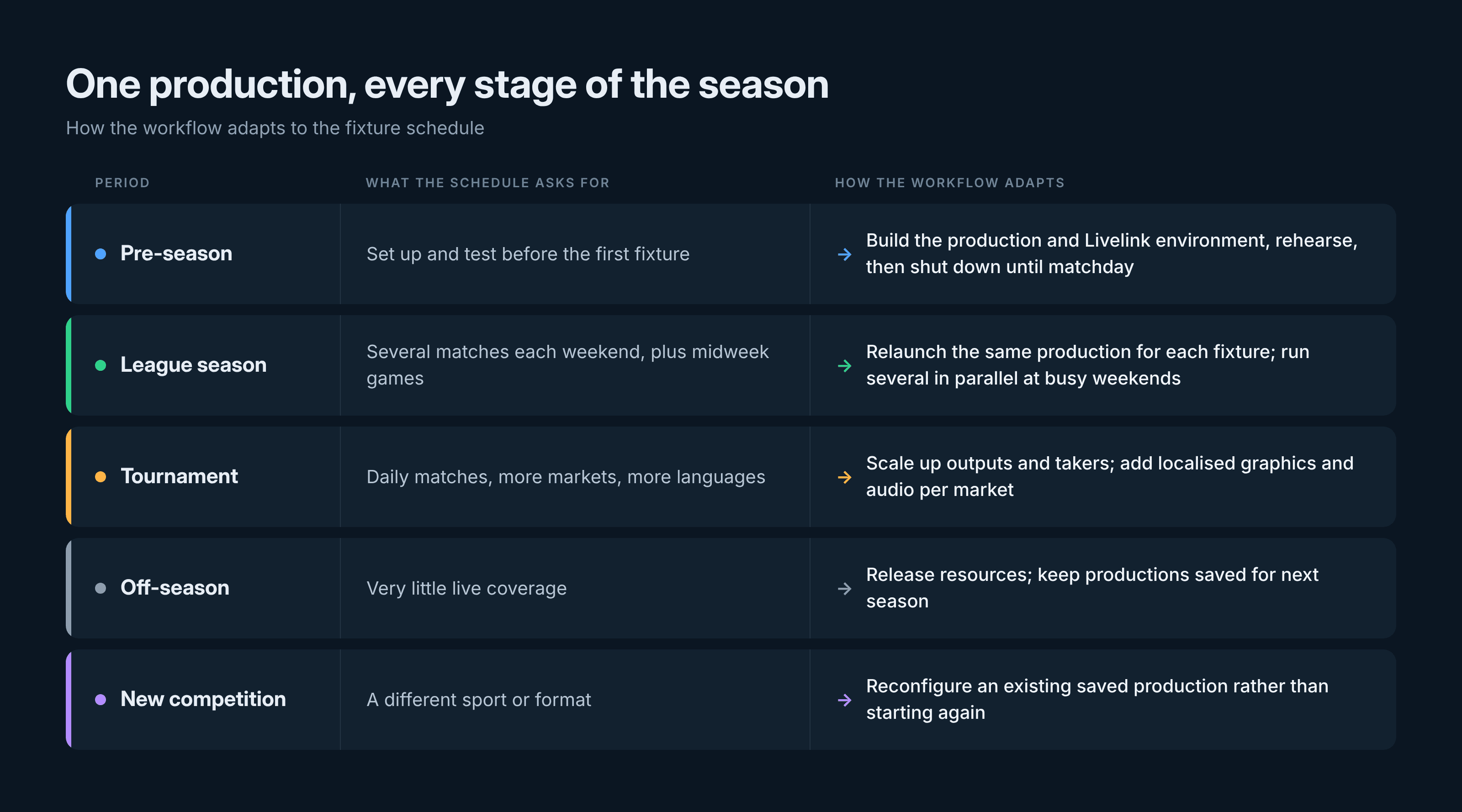
Across the year, the team works from the same platform and the same interface. What changes is how much is running, and how each workflow is shaped. Racing is a natural example of shifting requirements across seasonal production. The calendar is full of meetings of very different scale, from routine race days to festival weeks with complex same-day schedules and many international takers. Real-world Livelink use cases include Racecourse Media Group for occasional-use feeds and same-day events, and Tabcorp / Sky Racing for racing and betting feed distribution.
Right-Sizing Every Workflow
Seasonal sports coverage calls for workflows that adapt to more than the calendar. Broadcasters, rightsholders, and production companies need workflows they can adapt to the sport and type of coverage, run with appropriately sized teams working on site or remotely, and configure to produce and deliver localised versions for different markets.
With Livelink and Livelink Studio, teams can configure that combination for each fixture or competition, reuse it when needed, and scale resources up or down as the schedule changes — aligning production capacity and costs with the coverage they need to deliver.
Thinking about your next season? Get in touch to talk through how Livelink workflows could be planned around your sports schedule, or book a Livelink Studio demo.