

There has been a lot happening in Livelink over the past few months, from significant additions to inSight and historical statistics through to changes in notifications, billing, mobile access and the underlying platform.
Rather than run through every individual update, we’ve picked out five areas where the changes will have the biggest impact on how customers use Livelink day to day.
1. inSight: more than monitoring
What has changed
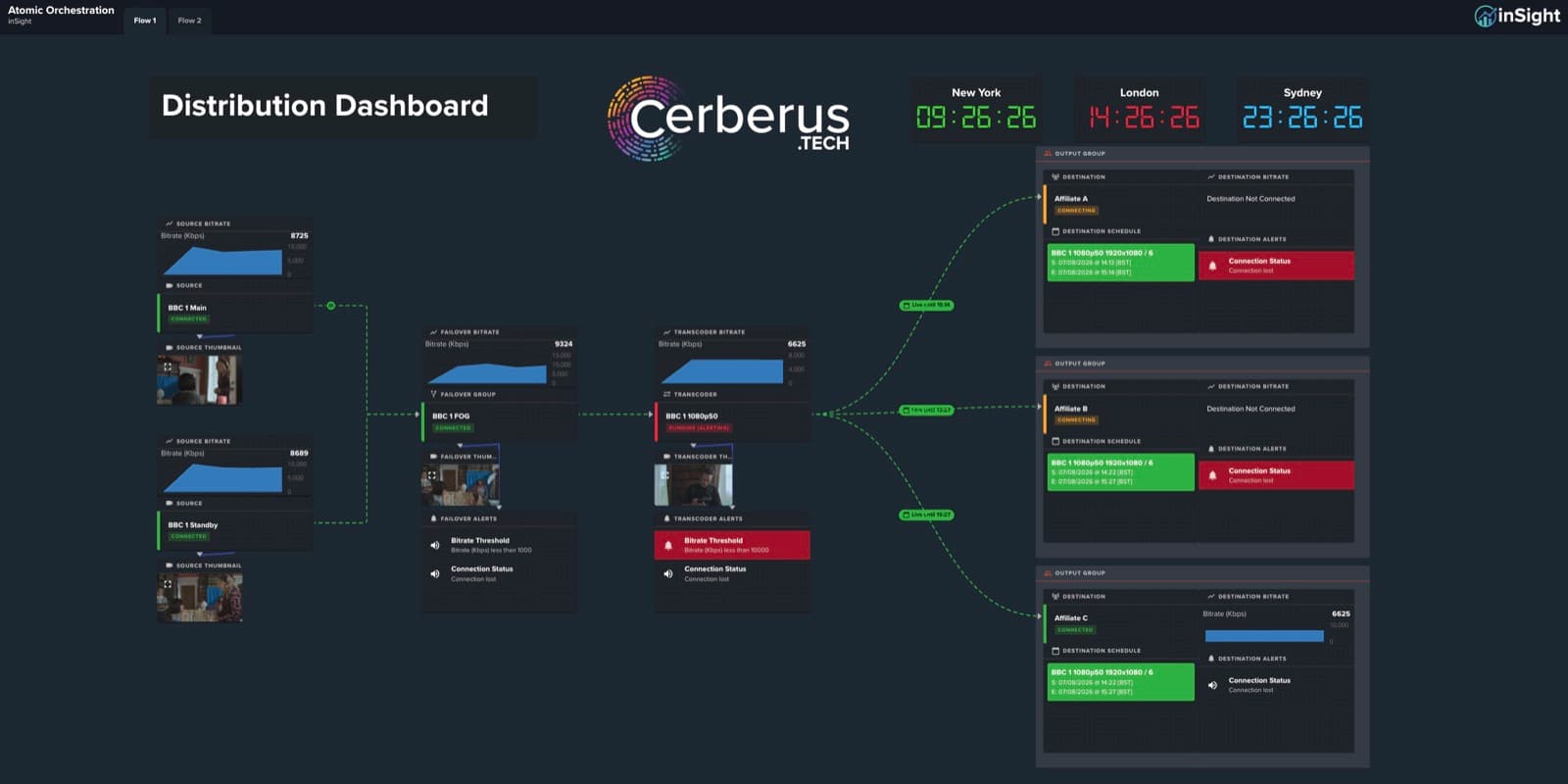
inSight has continued to develop from a flexible dashboard builder into a more complete operational workspace. Multi-flow dashboards allow more sophisticated views to be brought together in one place, while Monitoring and Operational dashboard types provide a clearer distinction between dashboards designed for visibility and those used to interact directly with a workflow.
We’ve also added new operational widgets, improved editing and change tracking, and made substantial performance improvements to larger dashboards.
Why this matters
An operational dashboard is most useful when it brings together the information and controls needed for a particular workflow, rather than simply displaying another set of statistics.
What customers get
More flexible dashboards, better performance and the ability to bring monitoring, operational controls and even current hourly spend together in a view designed around how they actually work.
2. Live and historical statistics
What has changed
Our new statistics platform introduces WebSocket-based live statistics alongside a rolling 30-minute view of bitrate, jitter, RTT, latency, packet loss, uptime and connection health.
The new Historical view extends that visibility across up to 30 days, with correlated charts, Min/Average/P95/Max summaries, automatic event detection and CSV export.
Why this matters
Seeing that something is wrong in real time is one thing. Understanding what happened several hours or days later can be much harder, particularly when you’re trying to establish whether an issue was isolated, sustained or related to a particular network characteristic.
What customers get
A much clearer route from “something went wrong” to understanding when it happened, how severe it was and what the underlying statistics show.
3. Better notifications and alarms
What has changed
Notifications can now be searched, filtered, sorted and managed much more easily, with clearer information about the resource and alert behind them. We’ve also replaced intrusive page-obscuring notifications with a more compact approach that keeps important alerts visible without unnecessarily interrupting what an operator is doing.
Why this matters
During a busy live operation, more alerts don’t necessarily mean better visibility. Operators need to be able to identify what requires attention without the notification system itself becoming a distraction.
What customers get
A clearer view of what needs attention, better tools for managing busy notification streams and less interruption while working elsewhere in Livelink.
4. Cost and access wherever you need it
What has changed
Billing now offers more flexible date-range exploration, more complete cost reporting and better visibility of inSight Advanced usage and allowances. Current hourly spend can also be surfaced directly within an inSight dashboard.
At the same time, dedicated responsive experiences have been introduced across the main dashboard, environments, sources, destinations, scheduler, billing and user settings.
Why this matters
Operational information isn’t only useful from a desktop, and cost shouldn’t necessarily sit in a completely separate reporting exercise from the workflow generating it.
What customers get
Easier access to system and cost information when away from a workstation, alongside a clearer understanding of what cloud workflows are costing while they’re running.
5. Lots of smaller changes, and some big ones you won’t see
What has changed
We’ve made improvements across scheduling, monitoring, UHD source configuration, data-track configuration, scrambling presets and upgrade workflows. Behind the interface, we’ve also substantially modernised Livelink’s application and real-time architecture.
Why this matters
Not every improvement needs to be a new headline feature. Small changes to common workflows can remove friction from everyday operations, while the underlying architectural work affects things like live-data freshness, responsiveness, organisation switching and overall reliability.
What customers get
A Livelink experience that should feel faster, more predictable and easier to operate today, with a stronger technical foundation for what we add next.
More to come
These updates cover a lot of ground, but they’re all part of the same ongoing process: looking at how Livelink is being used in real operational environments and continuing to improve the parts that can make those workflows simpler, clearer or easier to control.
We’ll be sharing more on some of these developments individually over the coming months.
Want a demo of Livelink?
Get in touch with the team, or use this link to book a time that is most convenient for you here.