
Livelink Studio · by Cerberus Tech
Broadcast-grade live production, on demand.
A complete cloud production and master control environment for broadcasters, rights holders and production companies. Build a production once, launch it any time, at any scale, and pay as you go.
- No hardware on standby
- No stitched-together tools
- No DIY orchestration
Illustration: venue sources drop into a production template and feed Studio A, which is mirrored by Studio B in another region; programme output flows on to Livelink and out to every taker.
Why Livelink Studio
Broadcast-grade production for every show, not just the flagship ones.
Livelink Studio extends proven provisioning, orchestration and automation into live production, so broadcasters can do more with less.
Built on the Livelink control plane + Matrox Origin
- Frame-accurate switching
- Uncompressed transport
- Low latency
- A/B redundancy
Provisioning
Builds each production the same way every time. Template-based configuration improves accuracy and time to air.
Orchestration
Ties together all the systems behind a live production so they work as one.
Automation
Does the heavy lifting in the background, so your team can focus on the show.
How it works
Build once. Go live whenever you need.
Illustration: a production template appears as outlines; launching drops sources, switching, audio, graphics, outputs and a backup into place; running lights the links between them; shutting down lifts them away, leaving the template, and relaunching drops them in again.
- Step 01
Build
Configure your production from templates: sources, switching, audio, graphics and outputs.
- Step 02
Launch
Spin up a complete, redundant production on demand, at the scale the event calls for.
- Step 03
Run
Operate the show from intuitive control surfaces, with full telemetry on every feed.
- Step 04
Shut down and relaunch
Shut it down cleanly when the show ends, then relaunch the same production for the next event.
Control surfaces
Switching, audio and graphics. Built in.
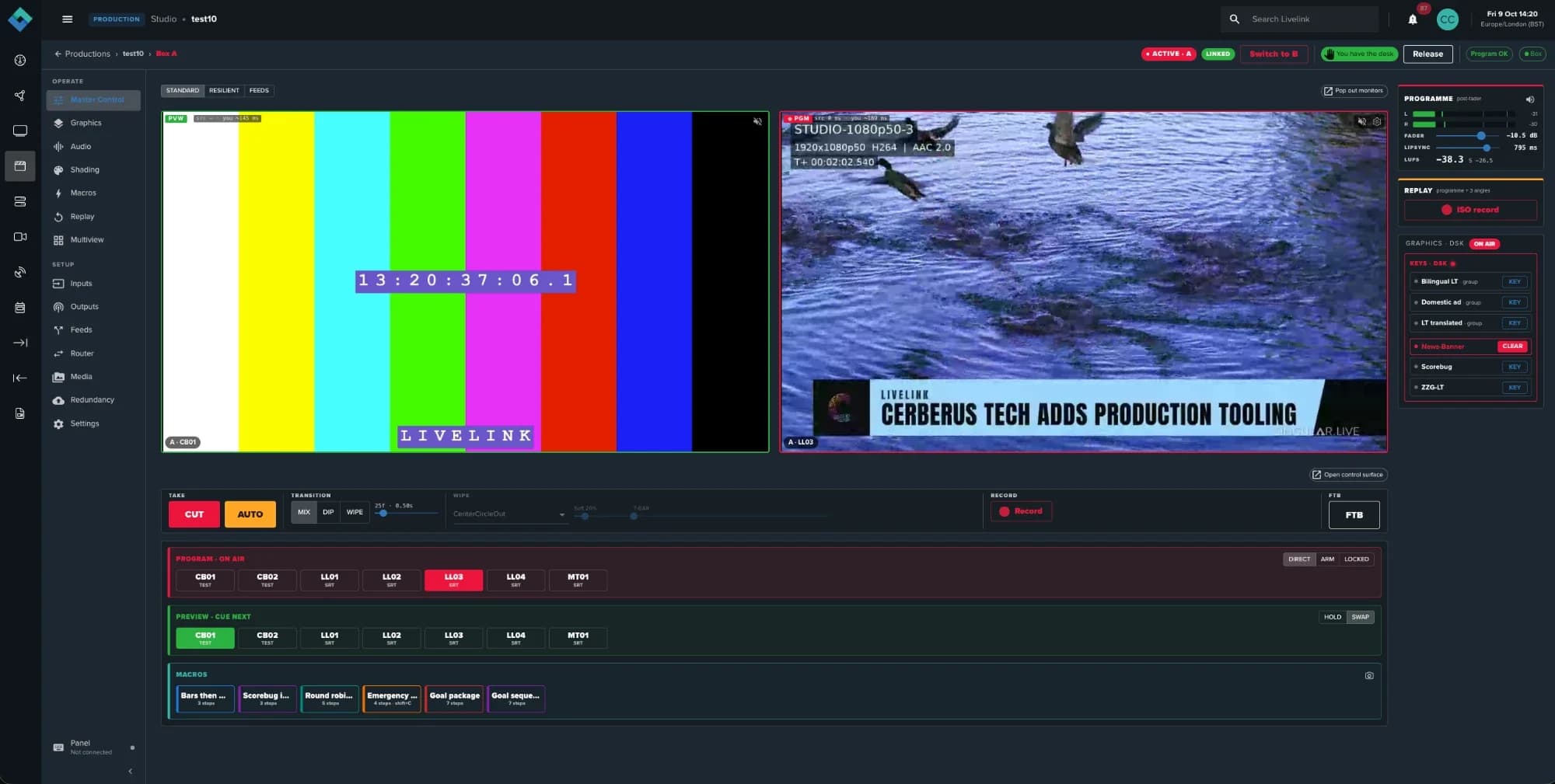
Intuitive control surfaces drive broadcast-quality production engines with frame-accurate switching, audio-video synchronisation, low latency and uncompressed transport.
Switching
- Live programme and preview monitoring
- Cut, auto, mix, dip and wipe transitions
- Frame-accurate switching
Audio
- Native mixing with per-channel faders
- VU metering
- Full digital signal processing
- Lip-sync adjustment
Graphics
- Overlays, lower thirds and tickers
- Downstream keying
- Live data feeds pulled straight into on-air graphics
Try the desk
Take master control.
Cue a source on preview, then cut or auto it to air. Key the lower third, fade to black. A pocket version of Master Control, running right here in your browser.
- Show log · every take lands here
One operator, or a whole crew
Run everything from a single screen, or split it across team members, remote or on site, with dedicated views and controls for each role.
Full API control and external panels
Drive Livelink Studio programmatically, or plug in the hardware panels your operators already prefer.
Product tour
Inside Livelink Studio.
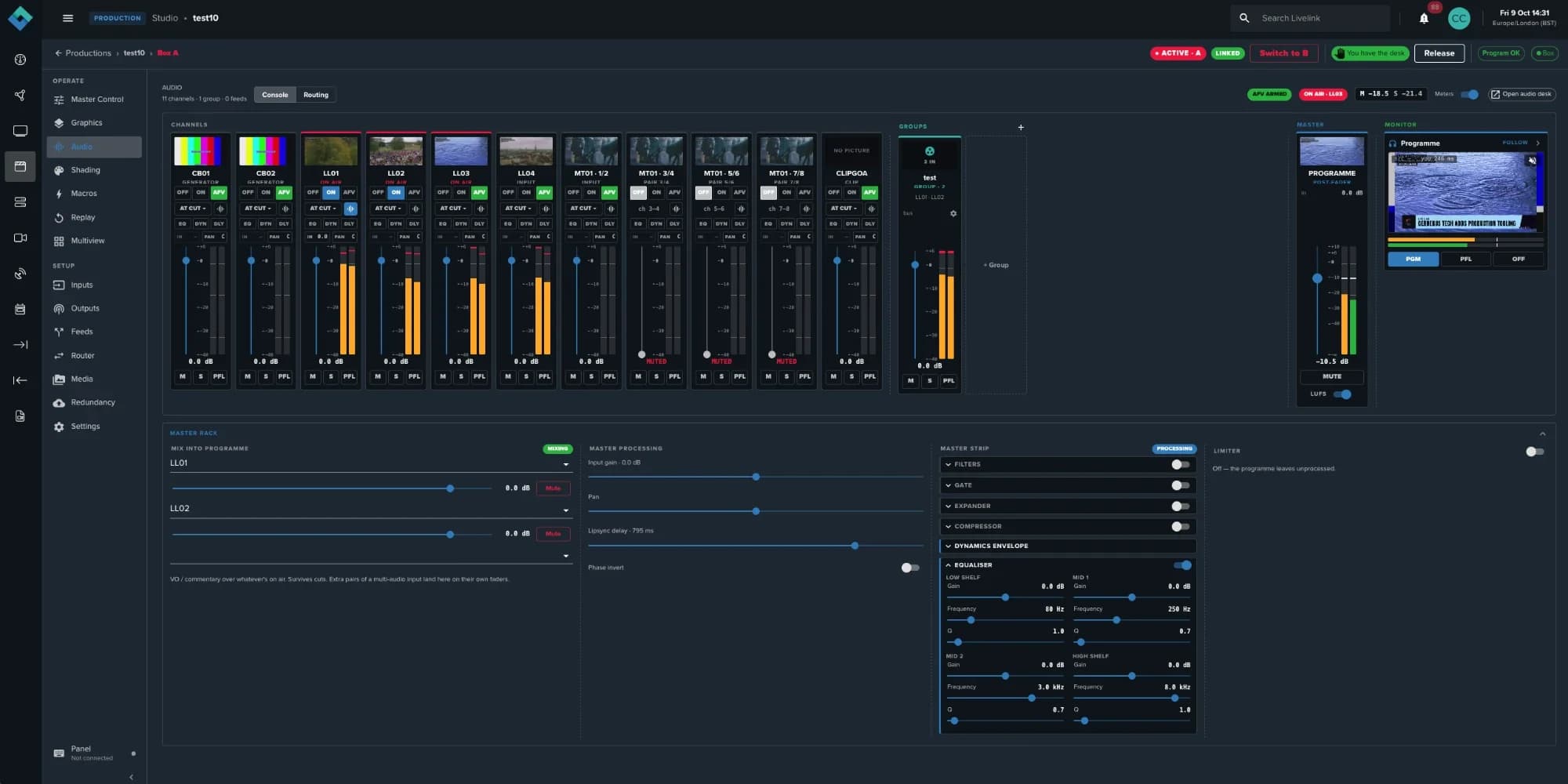
- Audio follows video
- Groups
- Master and loudness
- DSP on every channel
Audio
A full audio desk in the browser
Every channel gets its own digital signal processor, with fader control, routing and groups, audio-follows-video and a master strip with loudness metering.
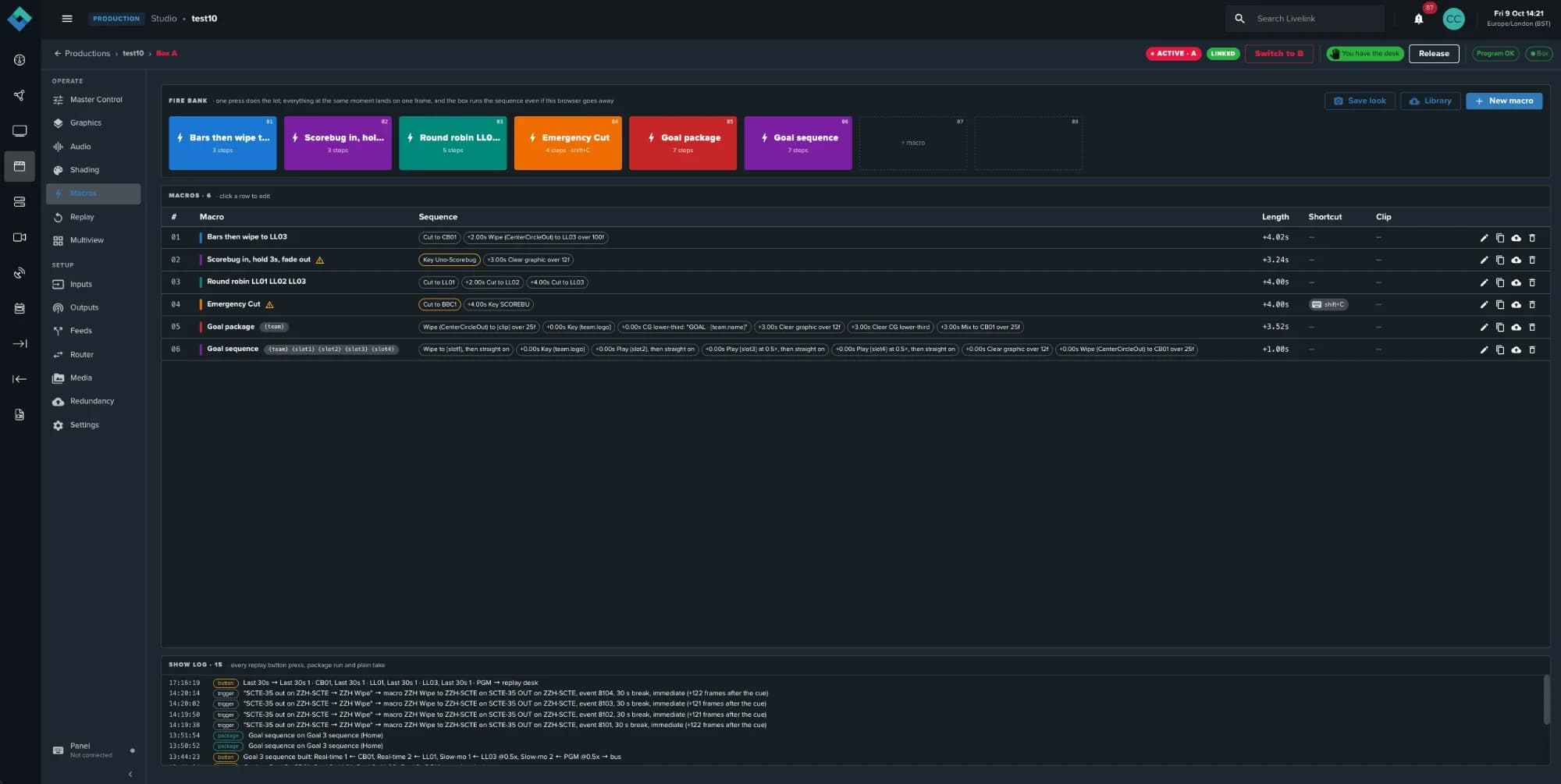
- One press does the lot
- Step-by-step sequences
- Keyboard shortcuts
- Show log
Macros
Unlimited custom macros
Build as many custom macros as you need, and label and colour them for easy identification. Edit, duplicate and delete as required, and fire a whole sequence with one press.
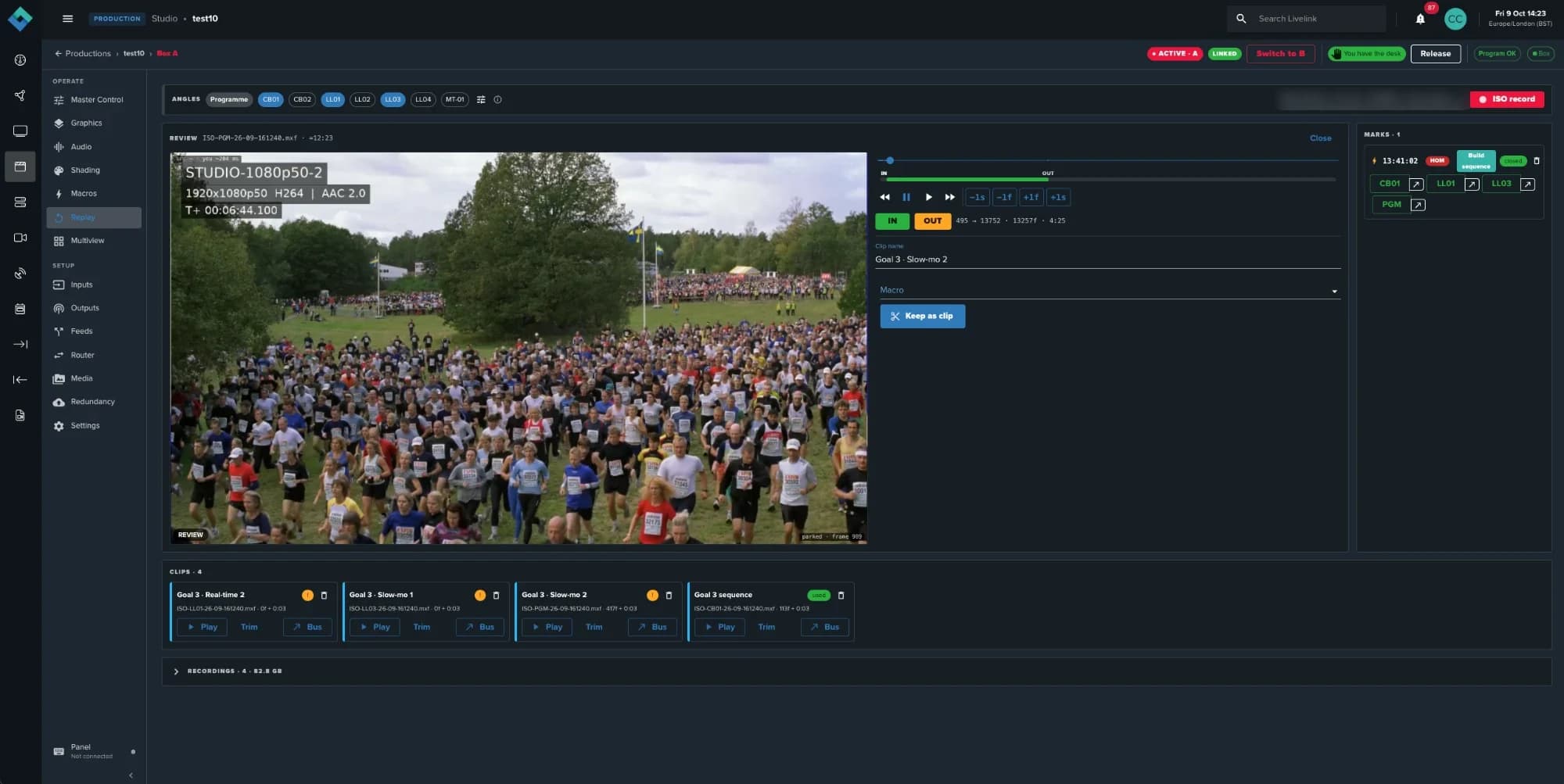
- ISO angles
- In, out and speed
- One-press marks
- Clips, ready to send
Replay
Replay station
Manage ISO recordings and replay sequences, with granular control of markers, speed and cuts for each clip. Send to the desk when ready.
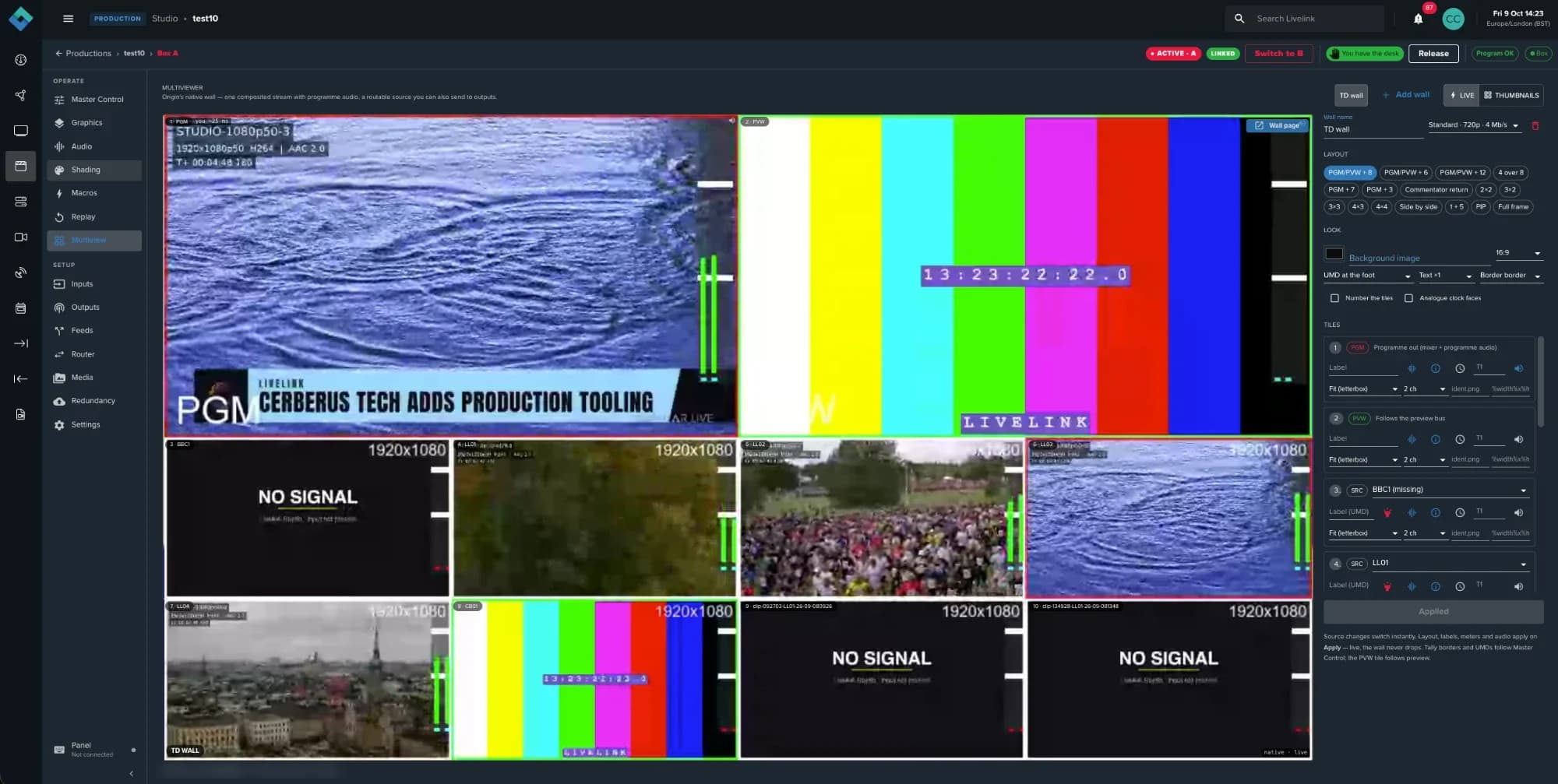
- Tally follows the desk
- UMDs and meters
- Sixteen layouts
- Per-tile settings
Multiview
Multiviewers for every role
Build multiviewers for different roles. Choose custom backgrounds, borders, UMDs, meters and more, and route any wall to an output.
Everything around the core
The essentials for running live, every day.
Operation
- Integrated multiviewer
- Media library with local and Amazon S3 storage
- Recording and routing
- Test signal generation
- Project format management
Visibility
- Real-time SRT telemetry
- Stream diagnostics
- Grafana integration
Protection
- Operator control locking
- Guarded deletion against accidental on-air disruption
Ingest
- Native Livelink and SRT ingest
- Automated workflow provisioning
- NDI input support
Resilience and integration
Built-in redundancy. Stand-alone or fully integrated.
Run Livelink Studio as a stand-alone module, or alongside Livelink contribution and distribution: programme output flows straight back into Livelink for transport, repackaging, scheduling and distribution to every taker.
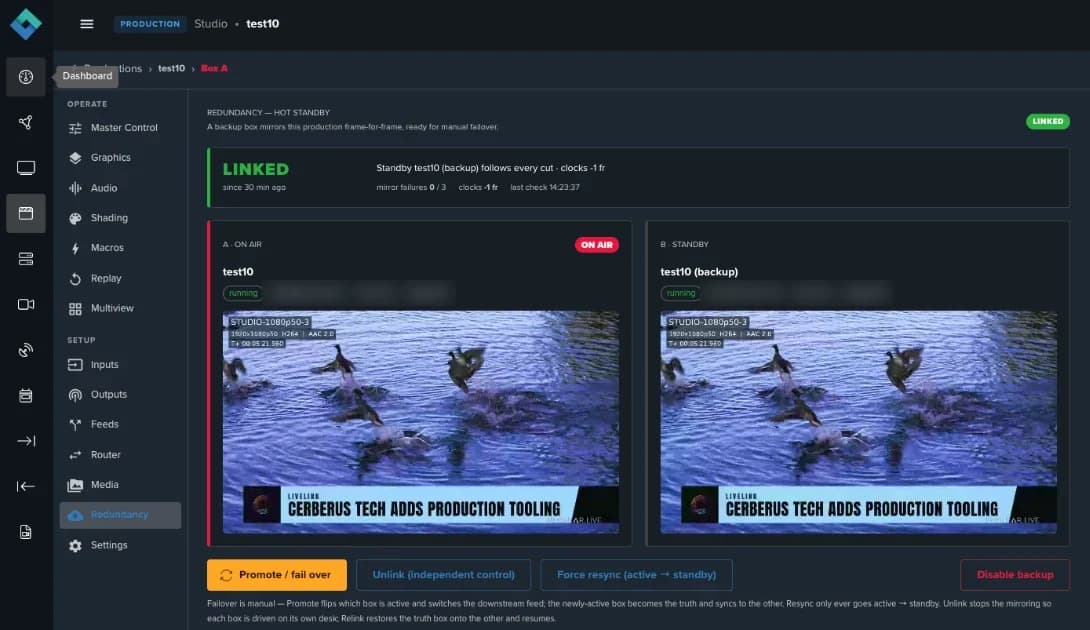
Redundancy
A backup engine that mirrors everything
Choose another cloud region to spin up a backup engine that mirrors every action, every button press and all graphics. Linked A and B engines are ready for one-press failover, can be unlinked for independent control, and Livelink can feed both from a single source.
Illustration: one Livelink source feeds engine A and engine B. Each key pressed on A is pressed on B a moment later. Engine A is lost, B is promoted and keeps the programme on air, then A comes back as the backup.
Use cases
More live events, for more audiences and markets.
Tailored world feeds
Adapt a world feed for each international market without building a new production every time.
Multi-language graphics
Apply data-driven graphics in multiple languages, with live data pulled straight to air.
Event-based channels
Launch a channel for the event, then shut it down cleanly when it ends.
Disaster recovery and overflow
Stand up disaster-recovery playout and cloud overflow for existing facilities.
Elevated everyday productions
Bring broadcast-grade quality to everyday shows without adding complexity.
Something else in mind?
Tell us about your show and we’ll show you how it would run.
Book a demo
FAQ
Questions, answered.
Do I have to replace my existing workflow?
No. Native Livelink and SRT ingest come with automated workflow provisioning, and NDI input support means Livelink Studio fits into existing workflows instead of replacing them.
Can I use Livelink Studio on its own?
Yes. It runs as a stand-alone module, or alongside Livelink contribution and distribution so programme output flows straight back into Livelink for transport, repackaging, scheduling and distribution.
What happens if something fails mid-show?
A backup engine in another cloud region mirrors every action, button press and graphic, ready for one-press failover. Linked A and B engines can also be unlinked for independent control, and operator control locking and guarded deletion protect against accidental on-air disruption.
Can my team work remotely?
Yes. One operator can run the show from a single screen, or roles can be split across team members, remote or on site, each with dedicated views, multiviewers and controls.
Can I use a hardware control panel?
Yes. External panels are supported and can be added from Master Control, alongside full API control.
How is it priced?
Livelink Studio is pay as you go: launch a production when you need it and shut it down when the show ends. It’s available self-serve or as a managed service.
Book a demo
Your next live production is one launch away.
See how simple it is to launch, run and shut down a live production with Livelink Studio.
See it live · 20–22 October 2026SVG TranSPORT and NAB Show New YorkMeet the team in New YorkBook a demo
Or email hello@cerberus.tech